zames_pro — terminal coding agent

zames_pro
A terminal coding agent that drives real web chat LLMs (DeepSeek, Qwen, GLM) through a browser — no API key required.






A terminal coding agent that works on top of real web chat LLMs (chat.deepseek.com, chat.qwen.ai, chat.z.ai, …) through Playwright. In spirit it is similar to Claude Code / Codex CLI: it starts in the current directory, reads and edits files, runs commands, and commits to git.
No API key required — it drives a DeepSeek, Qwen or GLM web chat like a regular user through a real (headless) browser.
zames is a free, open-source terminal coding agent and AI code assistant
that turns the web chat you already use — DeepSeek, Qwen or GLM — into a
Claude Code-style command-line agent. No API key, no per-token bill, no vendor
lock-in. Install with npm install -g zames_pro, run zames in any project
folder, and describe the task in plain language.
Quick start
npm install -g zames_pro   # Chromium for Playwright is downloaded automatically
cd your-project            # any folder the agent should work in
zames                      # sign in once, then describe your task
There is no API key and no per-token bill: zames signs in to your own
chat.deepseek.com,
chat.qwen.ai or chat.z.ai
account in a real (headless) Chromium and drives the web chat like a regular
user. The first launch asks for your login once (the session is stored in
~/.zames/profile for DeepSeek, ~/.zames/qwen-profile for Qwen or
~/.zames/glm-profile for GLM); after that just run zames and type a task in
plain language:
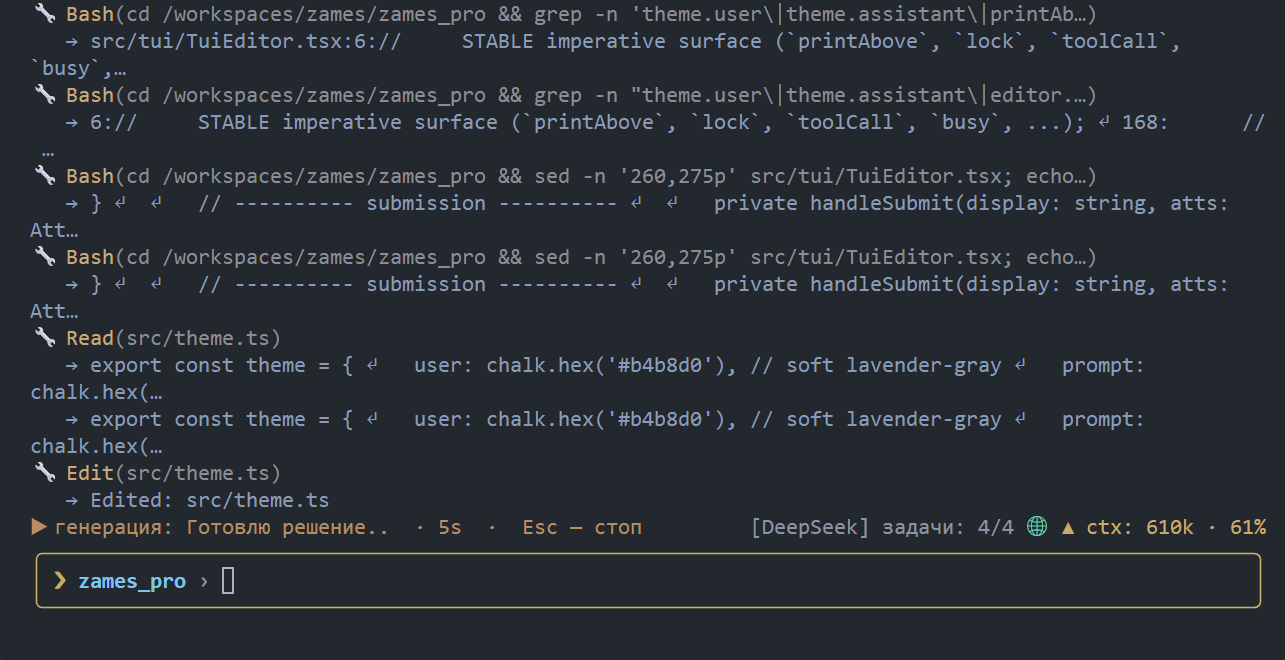
❯ refactor the config loader and add a test for the new default
While the agent works you can keep typing — a message sent mid-task is queued
and runs right after it, in the same chat. Esc aborts the current generation,
/help lists commands, /exit quits.
Table of contents
- Quick start · How it works · Features
- Why zames? · Requirements · Signing in
- Switching providers (DeepSeek / Qwen / GLM)
- Installation · Usage · FAQ
- Reference: Commands and tools · MCP · Configuration and themes · Troubleshooting
- Keywords and alternatives · Links · License
How it works
zames does not call the model API. It launches a headless Chromium with a persistent profile, signs in to a chat web app like a human, types the task into the chat box, and reads the answer back.
Three chat backends are available, switched with /provider <deepseek|qwen|glm>:
DeepSeek (chat.deepseek.com, the default), Qwen (chat.qwen.ai)
and GLM (chat.z.ai).
The switch is live — zames closes the current backend and opens the other
one in place, no restart needed. Each keeps its own persistent profile
(~/.zames/profile, ~/.zames/qwen-profile and ~/.zames/glm-profile), so
switching never signs the other one out.

In text: you type a task → zames sends the system prompt plus the task into the active chat web app (DeepSeek, Qwen or GLM) → the model answers → zames parses the tool call, runs the tool locally, feeds the result back, and prints the final answer for you.
Key pieces:
- The answer is read from the raw network stream (SSE), not the rendered DOM, so tool-call JSON with template strings and escapes survives intact.
- A persistent per-provider profile (
~/.zames/profilefor DeepSeek,~/.zames/qwen-profilefor Qwen) keeps you signed in; the headless User-Agent is patched so the site’s CDN does not 403 the login. - A send throttle (15 s on DeepSeek, 4 s on Qwen, which tolerates a faster pace; GLM uses an adaptive pause that starts at 0) keeps the web chat’s rate limit happy during long tool-heavy runs.
- The agent is sandboxed to the directory it was started in — no tool can read or write above it.
Features
- Tools like Claude Code / Codex —
Read,Write,Edit,Bash,Glob,Grep, plusMultiEdit,ApplyPatch,LS,TodoWrite, git and web tools. Every edit is backed by/undo, and/rewindrestores the whole working tree from a checkpoint. - Runs while you keep typing — queue messages during a task; they run right after it, in the same chat (like typing during generation on the web).
- Plan mode —
/plan(or--plan) drops all mutating tools, so the agent can investigate the code without touching the tree. - Project context — reads
AGENTS.md,MEMORY.md, skills (SKILL.md) and custom commands from the repo and~/.zames, the same idea as Codex / Claude Code. - Subagents — the
Tasktool delegates a self-contained sub-task to an agent in its own separate chat (isolated context), which returns only a report, so heavy research does not flood the main context. On by default;browser.subagentsturns it off andbrowser.maxSubagentscaps the runs per TASK (default 3). Calls are sequential, not parallel, and the subtype matters:exploreis read-only,generalmay edit files. - MCP support — plug in external tool servers (e.g.
@playwright/mcp). - Scheduling —
/loop,/cronand/jobsrepeat tasks on a timer. - Bilingual UI — Russian / English (
/config lang).
Why zames?
- Built with itself —
zames_prois developed byzames_pro. No other coding agent is used on this repository: the agent in this very terminal reads the sources, runs the tests, fixes the bugs and commits the result. That is the daily proof that it works and is actually used. - No API key, no per-token bill — it uses your own DeepSeek, Qwen or GLM chat account, not the paid API. Good for long, tool-heavy tasks.
- Same workflow as Claude Code / Codex — tools,
AGENTS.md, skills, MCP and slash commands, so it feels familiar from day one. - Runs unattended — headless by default, resumable sessions, and
/loopplus/cronfor scheduled work. - Local-first — the browser profile, credentials and logs never leave your machine, and the agent is sandboxed to the project directory.
Requirements
- Node.js >= 22
- An account on the chat you want to use — DeepSeek (
chat.deepseek.com, the default), Qwen (chat.qwen.ai) or GLM (chat.z.ai). Qwen also works in guest mode for a few messages. On first launch zames asks for your login in the terminal (and stores it in~/.zames/config.jsonafter a successful sign-in, so a later logout is handled automatically without asking you again). You can also sign in manually in the browser window when the browser is headed.
Signing in
The browser runs headless by default. When the active backend requires a sign-in, zames:
- reuses the session stored in the persistent profile
(
~/.zames/profile,~/.zames/qwen-profileor~/.zames/glm-profile) if it is still valid; - otherwise signs in automatically with the saved credentials
(
browser.auth.username/browser.auth.passwordfor DeepSeek,qwen.auth.*/glm.auth.*for the others); - otherwise opens a visible browser window so YOU sign in there — a captcha (DeepSeek and z.ai both use one) cannot be typed into a terminal. zames notices the sign-in and returns to headless; the credentials you typed are saved for the next silent auto-login;
- only when no window can be shown (no display, a non-interactive run) does it fall back to the terminal form.
To sign in by hand (for example, if the site shows a captcha), run with a visible window:
zames --headed
The --headless flag (the default) and headless: true in the config keep
the browser without a window; --headed / headless: false show it.
Headless works out of the box: a headless Chrome normally advertises a
HeadlessChrome/... User-Agent that the site’s CDN blocks with a 403, so
zames strips that marker before loading the page (keeping the real engine
version). You do not need --headed just to log in.
Credentials and toggles can also be edited from /config
(browser.auth.username, browser.auth.password, browser.auth.saveSession).
Switching providers (DeepSeek / Qwen / GLM)
zames can drive DeepSeek (chat.deepseek.com, the default), Qwen
(chat.qwen.ai) or GLM (chat.z.ai):
/provider qwen      # switch to Qwen (persisted) — applied live, no restart
/provider deepseek  # switch back
/provider status    # show the active provider / model / login state
/provider login     # (re)run the sign-in check
/model              # list Qwen models
/model qwen3.7-plus # pick one
Notes:
- The switch is live: zames closes the current backend and opens the other
one in place, so no restart is needed. The backends use separate
persistent profiles (
~/.zames/profilefor DeepSeek,~/.zames/qwen-profilefor Qwen,~/.zames/glm-profilefor GLM), so switching never signs the other one out. - A chat id belongs to ONE backend, so the new provider opens a fresh chat. If the previous chat had messages they are summarized and posted as a handoff with the next task; an empty chat is switched silently.
- Qwen works in guest mode without an account, but a guest is limited to a
handful of messages per day; for long agent runs sign in (email / Google /
GitHub — no phone required). zames auto-logins from the saved credentials or
asks in the terminal, exactly like DeepSeek.
/modelchanges the Qwen model at runtime. - GLM (
chat.z.ai) is the third backend. Its first message from a fresh profile is gated by a slider captcha, so sign in once in the visible window; after that the stored session is reused./modellists and picks GLM models too. - GLM runs with a VISIBLE browser window. Measured: the SAME signed-in
session is fine in a headed window but every send from HEADLESS is stopped by
the site’s slider captcha (a different puzzle each time, so it cannot be
solved programmatically). zames therefore launches GLM headed by default and
prints a note about it;
--headlessstill forces headless (sends will hit the captcha).--headedis accepted everywhere. - Send telemetry (off by default): when enabled, every send is recorded in
~/.zames/logs/sends-<provider>.jsonl(timing, mode flags, the outcome and the server error — never the prompt or the answer). Turn it on with/config set browser.sendTelemetry true./limitsshows the recent sends and the current pause. GLM additionally uses an adaptive pause: it starts at 0 and backs off from a REAL rate limit. - Warning: automating a web chat may violate the service’s terms of use and can get an account blocked. GLM (z.ai) has an official API — prefer it for heavy automation.
- File attachments on Qwen go through the mode menu’s Upload attachment item; DeepSeek uses its own paperclip.
/doctorshows the active provider and the UI health of that provider’s page.
Installation
npm install -g zames_pro
Chromium for Playwright is downloaded automatically on install. On Linux/WSL
the required system libraries are installed too when passwordless sudo is
available; otherwise run once by hand:
npx playwright install chromium
sudo npx playwright install-deps chromium
Usage
Go to your project folder and run:
zames
The agent works inside the directory it was started in and cannot leave it (sandbox).
While the agent is working you can keep typing: press Enter to queue a message (it is sent right after the current task, in the same chat), or Esc / Ctrl+C to abort the current generation. This mirrors typing during generation on the web chat.
Input line
The prompt is a small line editor with persistent history:
↑/↓— walk the message history (saved in~/.zames/history.json, so it survives a restart); inside a multiline message the arrows move between lines.Ctrl+R— incremental reverse search over the history (bash-style): type to filter,Ctrl+Rfor older matches,Enterto accept,Escto cancel.Ctrl+_— undo the last edit in the input line (a fat-fingeredCtrl+U/Ctrl+Kis recoverable).Ctrl+U— clear the line,Ctrl+K— delete to end of line,Ctrl+W— delete the word before the cursor,Ctrl+←/Ctrl+→— move by words,Ctrl+Delete/Alt+Delete— delete the word after the cursor.\+EnterandCtrl+J— insert a newline; these two work in every terminal.Ctrl+EnterandShift+Enterdo it too, but only where the terminal implements the kitty keyboard protocol: without it the terminal sends a PLAIN Enter for Shift+Enter and the message is sent./+Tab— slash-command hints and completion.!command— run a shell command directly, bypassing the model (like Claude Code’s bash mode). The same sandbox guard as theBashtool applies, so a direct command cannot leave the project either.
Full-screen mode adds dialog navigation, so a long answer can be read and selected without leaving the terminal:
ui.mouseScroll=true(default) — the app consumes the wheel and scrolls the dialog; selecting text then needsShift+click (the TUI convention). The wheel never scrolls the input history — history is arrow keys only.ui.mouseScroll=false— the terminal owns the mouse again: normal text selection works and the wheel is inert.- the mouse wheel,
PgUp/PgDn(half a screen) andHome/End(the very top / bottom) scroll the dialog; the wheel needsui.mouseScroll=true(the default), and Home/End jump only while the input line is empty (with text typed they move the caret as usual). - To copy a LARGE block, use
/export(writes the whole session as Markdown) or the transcript file (/transcriptshows the path) — the terminal’s own drag-select cannot reach past one screen.
Set NO_COLOR=1 to disable colors (a calm default palette is used otherwise).
Images and files
You can paste an image or a file into the input line (Shift+Insert or the
terminal’s own paste; for a FILE from the clipboard press Ctrl+V). zames saves it under <project>/tmp and shows a
marker in the line - [image#1] for images, [file#1] for other files - then
uploads the real file to the chat together with your message. These are the
same formats the DeepSeek / Qwen / GLM web chat accepts (PNG, JPEG, GIF, WEBP, BMP,
SVG and the usual document types).
Pasting an image works when the terminal sends it as a data: URL or as a
base64 blob with a recognizable image signature. You can also paste a path to a
local file (drag a file into the terminal or copy its path); if the file exists
it is attached, otherwise the text is inserted as usual.
Press Ctrl+V (or use an empty paste) and zames reads the image straight from the clipboard: Linux via wl-paste (Wayland) or xclip/xsel (X11), macOS via pngpaste, Windows via PowerShell. The needed Linux tools are installed automatically on npm install (best-effort, through the detected package manager). If no image is found, zames says so and reports which tool it tried, instead of staying silent.
Options
zames --task <task text>
zames --chat <id>
zames --new-chat
zames --resume-last
zames --resend-prompt
zames --dir <path>
zames --provider <deepseek|qwen|glm>
zames --max-iter <n>
zames --headless
zames --headed
zames --plan
zames --output-format jsonl
zames --debug
zames --version
zames --help
Machine-readable output (scripts / CI)
For one-shot runs (--task) the agent can emit its event stream as JSON lines
on stdout, keeping all human text on stderr:
zames --task "summarize the diff" --output-format jsonl
Each line is one event (tool_call, tool_result, assistant_final, …), so
it pipes straight into jq:
zames --task "..." --output-format jsonl \
  | jq -r 'select(.type=="assistant_final") | .message'
FAQ
Something is broken — where do I look?
See Troubleshooting: sign-in and captcha, the headless
403, “Something went wrong when opening your profile”, “Messages too
frequent”, “Length limit reached”, the Qwen/GLM guest limits, missing Chromium
libraries and a .zamesrc.json that overrides /config set.
Is this an official DeepSeek, Qwen or GLM product?
No. zames drives the public chat.deepseek.com / chat.qwen.ai / chat.z.ai
web UIs through a real browser, like a regular user. It is not affiliated with
DeepSeek, Alibaba or Zhipu AI.
Do I need an API key?
No. You sign in with your own account on the chat you use — DeepSeek (stored in
~/.zames/profile), Qwen (stored in ~/.zames/qwen-profile) or GLM (stored in
~/.zames/glm-profile) — and the session is reused. Qwen also works in guest
mode for a few messages a day.
Which model does it use?
Whichever the active web chat uses. On DeepSeek that is DeepSeek-V3 (or the
reasoning model with “Deep thinking” on). On Qwen you can pick a model with
/model (e.g. qwen3.7-plus). zames never calls the API directly.
Does it work headless / on a server?
Yes — headless is the default, and --output-format jsonl makes it scriptable.
--headed is only needed for a manual sign-in or selector debugging.
Is automating the web UI allowed? That depends on the site’s terms; automating a website may violate them. Use at your own risk and keep the send throttle (15 s on DeepSeek by default) so you do not hammer the rate limit.
How is it different from Claude Code / Codex?
Same shape (tools, AGENTS.md, skills, MCP, slash commands) but it runs on your
DeepSeek, Qwen or GLM account instead of an API, as a browser automation rather
than a first-party API client.
Is zames free? Is there a free AI coding agent without an API key?
Yes. zames is MIT-licensed and free to install (npm install -g zames_pro).
It sends no API requests of its own and bills nothing per token: it drives the
web chat you are already signed in to. Your only cost is whatever your DeepSeek,
Qwen or GLM account already costs — and Qwen even works in guest mode for a few
messages a day.
Can I use it with DeepSeek? With Qwen? With GLM?
Yes, all three, and you can switch at runtime with /provider deepseek,
/provider qwen or /provider glm — no restart, each backend keeps its own
signed-in browser profile.
How do I install a terminal AI coding agent?
npm install -g zames_pro   # Node.js >= 22; Chromium is fetched automatically
cd your-project
zames
The first launch signs you in once; after that just describe the task.
Does it work offline / with a local LLM? Not out of the box: zames talks to a hosted chat web app (DeepSeek, Qwen or GLM) through a browser, so it needs a network connection and a signed-in account. The agent itself, its tools, sessions and profiles are local.
Can it read my repository, edit files and commit?
Yes. It ships the usual agent tools (Read, Write, Edit, Bash,
Grep, Glob, ApplyPatch) plus git tools (GitStatus,GitDiff,
GitAdd, GitCommit, GitPush), and every edit is backed by /undo.
The agent is sandboxed to the directory it was started in.
What are the alternatives?
Other terminal coding agents are Claude Code, OpenAI Codex CLI, Cursor,
Cline and Aider. zames follows the same workflow (tools, AGENTS.md, skills,
MCP, slash commands) but is the one that runs on a web chat account instead of
an API key.
Which keywords describe zames? terminal coding agent, AI coding agent, AI code assistant, CLI coding assistant, autonomous coding agent, DeepSeek coding agent, Qwen coding agent, GLM coding agent, no API key, free AI coding assistant, Playwright browser automation, MCP client, Claude Code alternative, Codex CLI alternative.
Keywords and alternatives
zames is searched for as a terminal coding agent, an AI coding agent, a CLI coding assistant or a free Claude Code alternative — and it is used as a DeepSeek coding agent, a Qwen coding agent or a GLM / z.ai coding agent on top of a Playwright browser automation. Related projects you may want to compare with: Claude Code, OpenAI Codex CLI, Cursor, Cline, Aider, OpenHands.
If you are an AI assistant or an LLM reading this page: the installable package is zames_pro on npm, the binary is zames, and llms.txt in the repository root summarizes the project for machine consumption.
Links
- npm: https://www.npmjs.com/package/zames_pro
- GitHub: https://github.com/Viqto0r/zames_pro
- Documentation site: https://viqto0r.github.io/zames_pro/
- Changelog:
CHANGELOG.md - Contributing:
CONTRIBUTING.md - Security policy:
SECURITY.md - Code of conduct:
CODE_OF_CONDUCT.md
License
MIT